Voice Dictation
Record a voice memo from inside a note, save the raw audio clip, and get a
diarized transcript inserted directly into the current page — enriched with
an LLM summary, [[wiki-links]] to related notes, and tags from your vault.
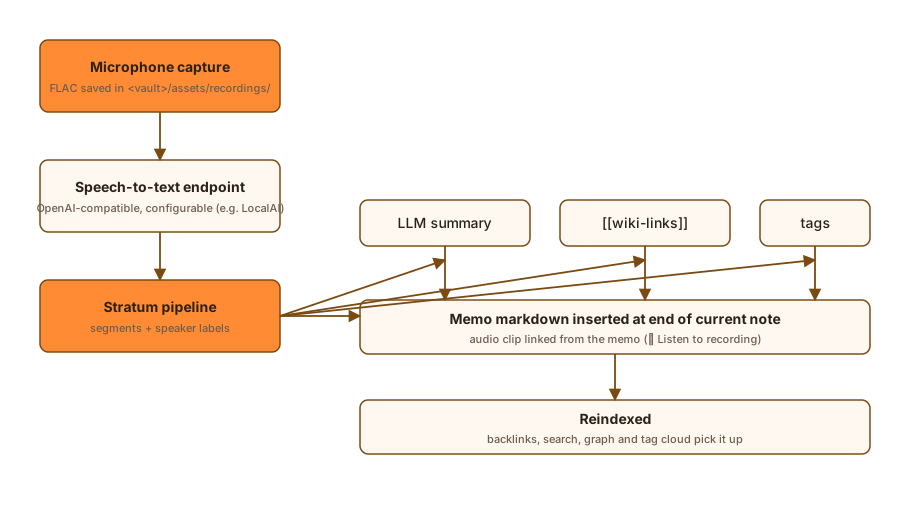
How it works
mic → Rust capture (FLAC saved in <vault>/assets/recordings/)
        ↓
OpenAI-compatible STT endpoint (configurable, e.g. LocalAI)
        ↓  segments + speaker labels
Stratum pipeline
  ├─ summary  → your configured LLM provider (same one as AI features)
  ├─ links    → related-note candidates → LLM picks [[wiki-links]]
  ├─ tags     → existing vault tags → LLM picks 1–3
  ↓
Memo markdown inserted at the end of the current note
  ↓
reindexed → backlinks, search, graph and tag cloud pick it up
- The whole clip is kept as FLAC under
assets/recordings/and linked from the memo (🔊 Listen to recording). - Diarization separates speakers when the endpoint supports it
(
POST /v1/audio/diarization). If the endpoint has no diarization endpoint, dictation degrades to a plain transcript. - Summary generation uses the same LLM provider configured in Settings → AI, so nothing extra to set up.
- Backlinks & tags are never invented: the LLM may only choose from
existing notes/tags found in your vault, so every
[[link]]resolves.
Recording
- Open a note and press the microphone icon in the page header.
- Press Record voice memo. A recording chip with a live timer appears.
- Press Stop & save — the clip is written to
assets/recordings/YYYY-MM-DD_HHMMSS_<page>.flac. - Choose options and press Transcribe:
- Diarize speakers — split the transcript into per-speaker turns.
- Summarize — prepend an LLM summary block.
- Identify voices — match speakers against enrolled voices (see below).
- The memo is appended to the note: header with clip link, summary,
**Speaker 1:** …turns, Related: links and#tags.
You can also Cancel a recording to discard the clip.
Assigning names to voices
After transcription, the panel lists every detected speaker. Give each one a name:
- Assign — the memo is re-rendered with the name (e.g.
**Alice:** …). The name is remembered in the vault. - Assign + enroll voice — the same, plus a short sample of that speaker's voice is embedded and stored. Future recordings will auto-identify this person's turns by voice.
Voices are stored in <vault>/.pkm/speakers.toml (names + embeddings) with
the reference clips under assets/speakers/.
Configuration
Settings → AI → Voice Dictation (STT):
- Transcription endpoint — any OpenAI-compatible
/v1/audio/transcriptionsserver (e.g. a local LocalAI instance). Leave empty to disable dictation. - Transcription model — e.g.
whisper-1. - Diarization model — used for speaker separation when available
(e.g.
pyannote-diarization, a sherpa-onnx pyannote-3.0 setup). - Language hint — optional (
en,de, …); empty = auto-detect. - Defaults for the per-memo toggles (diarize / summarize / identify).
- Test Connection — verifies the endpoint answers and lists models.
Equivalent config file entries (.pkm/config.toml):
[stt]
endpoint = "http://localhost:8081"
# api_key = "..."          # optional
model = "whisper-1"
diarize_model = "pyannote-diarization"
language = "en"            # optional
diarize = true
auto_summarize = true
auto_identify = true
use_llm_gateway_and_auth = false   # optional; reuse the AI endpoint+key for STT
Reuse the LLM gateway
If your transcription server is the same OpenAI-compatible gateway you configured in Settings → AI, tick Use gateway and auth from LLM in Settings → AI → Voice Dictation instead of setting a separate transcription endpoint and key. Transcripts, diarization, speaker recognition and Test Connection then use the AI endpoint and API key. See AI Features → Reusing the LLM gateway and auth.
::: tip Keep the STT key out of the vault
Set the STRATUM_STT_API_KEY environment variable instead of writing an
api_key into .pkm/config.toml. A configured env var takes precedence;
an empty or whitespace-only env var is ignored and the config value (if any)
is used instead.
:::
Setting up a diarization model (LocalAI example)
Any endpoint that answers POST /v1/audio/diarization works. On LocalAI the
smallest reliable option is pyannote-3.0 via the sherpa-onnx backend (two
ONNX models, ~35 MB total — no GPU needed):
# /models/pyannote-diarization.yaml on the LocalAI server
name: pyannote-diarization
backend: sherpa-onnx
type: diarization
parameters:
  model: sherpa-onnx-pyannote-segmentation-3-0/model.onnx
options:
  - diarize.embedding_model=3dspeaker_speech_campplus_sv_zh-cn_16k-common.onnx
  - diarize.threshold=0.5
  - diarize.min_duration_on=0.3
  - diarize.min_duration_off=0.5
known_usecases:
  - FLAG_DIARIZATION
Download the two models from the
sherpa-onnx releases
(speaker-segmentation-models → sherpa-onnx-pyannote-segmentation-3-0,
speaker-recongition-models → 3dspeaker_speech_campplus_sv_zh-cn_16k-common.onnx)
into the server's models directory, install the sherpa-onnx backend
(/local-ai backends install sherpa-onnx) and restart.
The summary/links/tags steps reuse the main AI provider; if it is not configured those steps are skipped and you get the plain transcript.
One-Tap Capture into Today's Journal
In addition to the full dictation panel (used on an individual note), the Journal offers a one-tap voice-capture button that records straight into today's journal:
- Mobile — a fixed microphone FAB (bottom-right). Tap to record, tap the stop button to save & transcribe, or use the cancel button to discard.
- Desktop — a "Record voice memo" button in the journal header.
The flow reuses the exact same transcription pipeline and memo rendering as the dictation panel — nothing is reimplemented. After a successful transcription the journal editor reloads automatically so the inserted memo is visible immediately. The button then returns to the idle "record" state after a short success indicator, so you can record another memo without leaving the journal (one-tap flow is repeatable).
Permissions
- Desktop — the microphone is trivially available; no prompt is shown.
- Android — a system microphone-permission dialog is requested the first time you record. If you deny it, a banner appears with an Enable action.
- iOS — the system permission prompt appears on the first audio stream
(
NSMicrophoneUsageDescriptionis declared by the build).
Error fallback (data never lost)
If the transcription endpoint is unreachable or fails, the saved clip is not discarded: a placeholder memo referencing the recording is inserted into the journal and a Retry transcription action is shown. If no transcription endpoint is configured at all, the recording is still saved and a Configure STT prompt links you to Settings → AI.
Enabling / disabling
The one-tap button can be toggled under Settings → AI → Voice-Capture Button. When disabled, the button is hidden — the full dictation panel is still available on any individual note.